Showing posts with label Error. Show all posts

Friday, November 14, 2014

Epson NX130 End of Service Error

This program fix the problem of Epson Printer model Epson Stylus NX130 All-In-One Color Inkjet Printer. The error to fix is end of service life
  •  Unzip the file with  download file using the Winrar Program 
  • run the program AdjProg.exe 
  • Download  Windows 7, Windows XP compatible epson resetter
  • Click on Accept
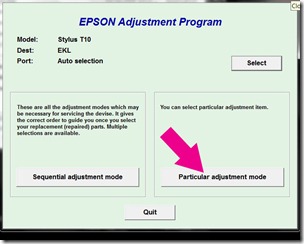
  • Press the button Particular adjusment mode
  • In Model Name select Epson Stylus TX121 then selects Port USB port where your printer NX130 on and Click OK
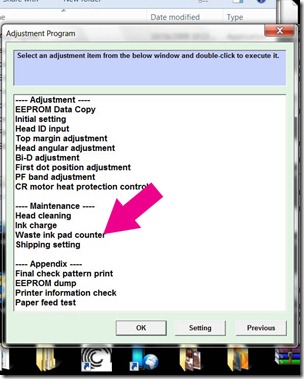
  • Select the Waste ink pad counter and press OK
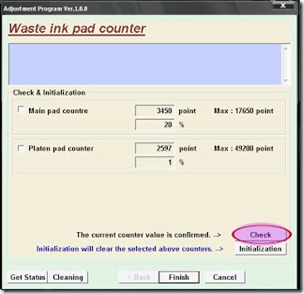
  • Select the button Check for current counter value eeprom of your printer, then check or check the boxes pad Main Counter and FL Box Counter .
  • Then press the button Initialization to reset the counters to 0 
  • Press the button OK and magically the counter will be reset, turn off the printer, press the button Finish to close the window. 
  • Close the program by pressing the button Previous and then press Quit.
Turn off and turn on the printer. Done
Read more

Wednesday, November 12, 2014

Epson TX220 alternate red light Blinking error

Repair the Epson Printer problem model Epson TX220 with an error of  "parts inside printer near end service life” or “parts inside printer end of service life”. or alternate blinking. But before follow the procedure, make sure that the power of the printer is on, usb cord properly connected to your computer and most of all there’s no pending print task in your printer.

Follow the steps below:
  • Open AdjProg.exe
  • Click Accept
  • Click Select button, and click your printer model
  • Click "OK"
  • Click the Particular Adjustment Mode
  • Select Waste ink pad counter
  • Click OK
  • Click Initialization (this will reset counter)
  • Turn off the printer
  • Then turn on again.
Download Windows 7 32 bit or Windows Xp Epson Resetter compatible program
Read more

Epson Stylus T13 Epson Stylus ME32 end of service life error

FIX PRINTER ERROR parts inside printer  end service life or part inside your printer is near end service life. Note: Before  opening  the program into your storage device, adjust first the date of your computer  depending of what kind of Epson Resetter. This program is compatible for Windows Xp and Windows 7 32 bit version. Extract the compressed files after changing the time of your pc systems So heres the guide.
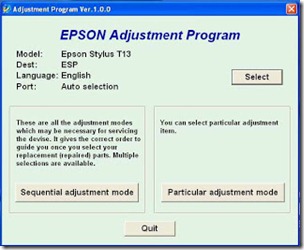
  • Open the . Click “Accept” button to open the program

adjustment

Click "Select" button. and choose your printer model then click "OK"
particular

Click “Particular adjustment mode” button.
pad

Select on “Waste ink pad counter” and click “OK” button
initialize

Check on Main pad counter and click on “Initialization” button and the program will reset the protection counter.
  • Turn off the printer as a program instructed then turn on again
Note: I used different images  of resetter  because I don’t have time to open all the resetter and take a screenshot. Almost all of Epson adjustment program menu is identical.
Read more

Sunday, November 9, 2014

Epson Stylus S22 Parts inside error

Parts inside printer near end service life” or the message “parts inside printer end of service life”. but before following the procedure, make sure that the printer is on, usb cord properly connected to your computer and most of all there’s no pending print task in your printer. This epson resetter is for the Epson Printer with a model of Epson Stylus S22.

 Follow the steps below:
  • Open AdjProg.exe
  • Click Accept
  • Click Select button, and click your printer model
  • Click "OK"
  • Click the Particular Adjustment Mode
  • Select Waste ink pad counter
  • Click OK
  • Click Initialization (this will reset counter)
  • Turn off the printer
  • Then turn on again.
download Epson resetter  here 
Read more

Thursday, November 6, 2014

RESET ERROR 21000068 ON EPSON T50 AND T60

Reset Error 21000068 On Epson T50 And T60, Have you get an error 21000068 when resetting your Epson Epson T50 or T60 and I see no solution to avoid the problem. Why not try this advice, but to restore this method is not recommended for the beginner and the user must understand what you are doing. These tips from Jagdish Rathore (India) and has granted me permission to post to this blog. It has also been the publication of this method to restore his blog at: http://www.epsonservice.blog.com/. If you have no knowledge of PCB and electronics, I recommend not trying to restore méthode.

Here the adjustment method :
Turn off the printer and printing files.
Open your advice Epson main board. You can see an 8-pin CMOS IC. Thats a waste of ink Epson against CI and found in all Epson printers.
You can configure your printer without resetter along these roads.
Solder pins 1,2,3,4 no cable as shown in the image and the printer now "second 20"
After 20 seconds turn off the printer and remove the pin welding cable no. 1,2,3,4 (back in original)
Now, turn on your printer
And now the printer is resetTag: Reset Error 21000068 On Epson T50 And T60
Read more

Monday, November 3, 2014

Ink Overflow error Epson Stylus TX510 and Epson TX515 or end of service life error

Fix printer problem "parts inside printer near end service life” or “parts inside printer end of service life”, but before follow the procedure, make sure that the power of the printer is on, usb cord properly connected to your computer and most of all there’s no pending print task in your printer.

 here for Epson Resetter programFollow the steps below:
  • Open AdjProg.exe
  • Click Accept
  • Click Select button, and click your printer model
  • Click "OK"
  • Click the Particular Adjustment Mode
  • Select Waste ink pad counter
  • Click OK
  • Click Initialization (this will reset counter)
  • Turn off the printer
  • Then turn on again.
Finish 
Read more

Friday, October 31, 2014

Epson Stylus Tx550w Alternate Blinking Error

Fix the error parts inside the printer is near  end of service life, but before follow the procedure, make sure that the power of your epson printer is on, usb cord properly connected to your computer and most of all there’s no pending print task in your computer to printer. With this program you can repair the error of your  Epson Printer with a  model Epson  Stylus Tx550w .

Before Opening the program, check first if there is a readme file inside the compressed file. Just follow the guide what is written there.

Windows XP and Windows 7 here  download Epson Resetter

Follow the steps below:
  • Open AdjProg.exe
  • Click Accept
  • Click Select button, and click your printer model
  • Click "OK"
  • Click the Particular Adjustment Mode
  • Select Waste ink pad counter
  • Click OK
  • Click Initialization (this will reset counter)
  • Turn off the printer
  • Then turn on again.
Read more

Reset Epson Stylus C79 End of service life error

parts inside printer end of service life, but before follow the procedure, make sure that the power of the printer is on, usb cord properly connected to your computer and most of all there’s no pending print task in your printer. 

Follow the steps below:
  • Extract and Open the program 
  • Click Accept
  • Click Select button, and click your printer model
  • Click "OK"
  • Click the Particular Adjustment Mode
  • Select Waste ink pad counter
  • Click OK
  • Click Initialization (this will reset counter)
  • Turn off the printer
  • Then turn on again. 
Read more

Thursday, October 30, 2014

Fix Epson Stylus TX800 and Epson Tx810w Blinking Error

Fix Parts inside printer near end service life, parts inside printer end of service life or ink overflow problem, but before follow the procedure, make sure that the power of the printer is on, usb cord properly connected to your computer and most of all there’s no pending print task in your printer. This Epson Resetter is for the following Epson Printer Model Epson Stylus TX800 and Epson  STylus  Tx810w.

Follow the steps below:
  • Open program
  • Click Select button, and click your printer model
  • Click "OK"
  • Click the Particular Adjustment Mode
  • Select Waste ink pad counter
  • Click OK
  • Click Initialization (this will reset counter)
  • Turn off the printer
  • Then turn on again.
Done

Read more

Alternate Red light Blinking Error of Epson Stylus Tx600W

Repair parts inside printer near end service life or ink overflow error. Before follow the procedure, make sure that the power of the printer is on, usb cord properly connected to your computer and most of all there’s no pending print task in your printer. This Epson Resetter is for the following Epson Printer with a model of  Epson Stylus Tx600W. Download  Windows 7 32 bit or Windows XP Epson Resetter

Follow the steps below:
  • Open AdjProg.exe
  • Click Accept
  • Click Select button, and click your printer model
  • Click "OK"
  • Click the Particular Adjustment Mode
  • Select Waste ink pad counter
  • Click OK
  • Click Initialization (this will reset counter)
  • Turn off the printer
  • Then turn on again.

here to download Epson Resetter


Read more

Sunday, October 26, 2014

Reset Epson CX 9300F End of Service Life Error Fix

Epson Stylus CX9300 Reset, Repair parts inside printer near end service life, but before follow the procedure, make sure that the power of the printer is on, usb cord properly connected to your computer and most of all there’s no pending print task in your printer. Click here to download Windows 7 32 bit and Windows Xp Epson Resetter

Follow the steps below:
  • Open program 
  • Click Accept
  • Click Select button, and click your printer model
  • Click "OK"
  • Click the Particular Adjustment Mode
  • Select Waste ink pad counter
  • Click OK
  • Click Initialization (this will reset counter)
  • Turn off the printer
  • Then turn on again.
Done!
Read more

Sunday, October 19, 2014

Epson Stylus Photo R2880 Alternate Blinking error

Before following the procedure, make sure that the power of the printer is on, properly connected to your computer and most of all there’s no pending print task in your printer. This Epson Resetter is for  Epson Stylus Photo R2880 Printer.

The Epson Stylus Photo R2880 Printer Model


Follow the steps below:
  • Open AdjProg.exe
  • Click Accept
  • Click Select button, and click your printer model
  • Click "OK"
  • Click the Particular Adjustment Mode
  • Select Waste ink pad counter
  • Click OK
  • Click Initialization (this will reset counter)
  • Turn off the printer
  • Then turn on again.
Finish

Click here to download the epson resetter
Read more

Near end of service life Epson Stylus R290 Printer Error

Before opening the Epson adjustment program, make sure that the power of the printer is on, properly connected to your computer and most of all there’s no pending print task in your printer. Click here to download the epson resetter Windows XP or Windows 7 32 bit program. This Epson Resetter is for the Printer Model, Epson R285, Epson R280 and of course Epson Stylus Photo R290 Printer.

I can not guarantee that  This Epson Resetter will work to your printer. Depending on your location or your printer bought, The Epson Resetter for this said model dont work. Like in Asia. The epson resetter came from south america is not working for this. Just post the comments if this doesnt work


The Epson Stylus R290 Printer


Follow the steps below:
  • Open AdjProg.exe
  • Click Accept
  • Click Select button, and click your printer model
  • Click "OK"
  • Click the Particular Adjustment Mode
  • Select Waste ink pad counter
  • Click OK
  • Click Initialization (this will reset counter)
  • Turn off the printer
  • Then turn on again.

Read more

Saturday, October 18, 2014

Epson Stylus Photo TX720WD Alternate Blinking Error

This program is for the Epson Printer with a model of Epson Stylus Photo TX720WD. Before opening the Epson adjusment “Adjprog.exe”, adjust first the date of your computer depending of what kind of Epson Resetter did you have. And make sure there is no pending print task in your printer. Click here the windows 7 download epson resetter program

Open the program.
 Click “Accept” button to open the program


Click "Select" button. and choose your printer model then click "OK"

particular

Click “Particular adjustment mode” button.

pad

Select on “Waste ink pad counter” and click “OK” button

initialize

Check on Main pad counter and click on “Initialization” button and the program will reset the protection counter.
  • Turn off the printer as a program instructed then turn on again
  • Finish !
Read more

Thursday, October 16, 2014

The Epson Stylus CX3900 Repair Service Life Error

Reset the counter of CX3900 printer problem and print back to normal after following the troubleshooting guide. The Message “printer near end service life” or “printer end of service life”, it does not mean that you should throw the printer. There was no problem of your printer, the problem is that’s its maximum counter limit value have reach to its maximum allowed.To fix the this kind of problem you need to download the program and before opening the Epson adjustment utility, make sure that the power of the printer is on, properly connected to your computer and most of all there’s no pending print task in your printer.

The Epson Stylus CX3900 Printer Cartridges


Follow the steps below:
  • Open AdjProg.exe
  • Click Accept
  • Click "OK"
  • Click the Particular Adjustment Mode
  • Select Waste ink pad counter
  • Click OK
  • Click Initialization (this will reset counter)
  • Turn off the printer
  • Then turn on again.
Finish

Click here to download the resetter
Read more

Monday, October 13, 2014

Epson RX585 Repair near end service life error

Fix the near end of service life error and bring back your epson printer into life. Make sure that the power of the printer is on, properly connected to your computer and most of all there’s no pending print task in your printer. This Program is for Epson Printer with a model of Epson RX585.


Click here to download the Epson Resetter
The Epson Stylus RX585 Printer

rx585
Follow the steps below:
  • Open AdjProg.exe
  • Click Accept
  • Click Select button, and click your printer model
  • Click "OK"
  • Click the Particular Adjustment Mode
  • Select Waste ink pad counter
  • Click OK
  • Click Initialization (this will reset counter)
  • Turn off the printer
  • Then turn on again. 
Read more

Tuesday, October 7, 2014

Resetter Canon ip2770 Error 006

Resetter Canon ip2770 Error 006

Resetter Canon ip2770 Error 006 No matter how you use the printer, but sooner or later the error problem can not avoid. Well to keep watch so that if one day your printer is problematic in this case specifically for the Canon PIXMA iP2770 type, Software Resetter and Reset on how to do this printer you can download and learn. It was counted to reduce the cost of service fees at some point if you are having problems error on Canon PIXMA iP2770 Printer 

for download Resetter Canon ip2770 Error 006 Her click here

Login to the Service Mode iP2770 :

  • Turn off the printer first and then let the power cord still attached on electricity .
  • Press and hold the RESUME button , ( Do not Removable )
  • Then press and hold the POWER button until the green light on ( when pressing the POWER button , Resume button ... jgn removed first )
  • Then release the RESUME button , but do not release the POWER button .
  • While the POWER button is still depressed , press the Resume button 5 times . Led will light turns green to orange last flame orange . ( not to be mistaken 4x because the printer will die in total , but also temporary ) Purpose of death while if 4x is pressing for about 30 minutes the condition of the printer can not be in anything apain , unplug all the cables are plugged in and after 30 minutes the printer can revived .
  • Release both buttons simultaneously .
  • Led will blink briefly then will flash GREEN .
  • The computer will detect a new device , ignore it .....
  • This situation shows the iP2770 printer is in a state of SERVICE MODE and ready to be reset .


Then run Resetter iP2770 his v1074: 

  • File Exctract Resetter iP2770. 
  • 2 Prepare the paper in the printer (to print at the time the reset process). 
  • Run the program Resetter iP2770
  • Click the "PLAY", then the printer will proceed, then iP2770 will print one page with the words( "D = 000.0" )
  • Click the "Clear EEPROM". 
  • Then click "EEPROM", and the printer will print the results Resetter iP2770. One of his row as follows: "TPage (TTL = 00000)" 
  • Turn off the printer by pressing the POWER button. 
  • Up here if all goes well, its too Printer will reset and is back Normal.
Read more