Showing posts with label Stylus. Show all posts

Friday, November 14, 2014

Epson Stylus L200 All in One and L800 Ink Level Reset

Reset Ink Level Epson L100, L200, L800 without SN ID Inks.

Epson Printer L Series Epson Inkjet  L100 , Epson L200 All in One Printer and Epson Inkjet Photo L800 is an official of the vendor printer Epson combination. If the Ink Level of this printer Epson L100, L200 or L800 show the position vacant / empty, then usually you have to enter SN ID listed at Epson Ink bottle.

Now the trick is about How to Reset Ink Level Epson L100, L200, L800 without SN ID Inks. So you no longer need to enter when the SN ID Ink Epson Ink Level L100, L200, L800 shows the position is  empty.

Download Program Epson Resetter Ink Level program for  Epson L100, L200, L800
How To Reset Ink Level Epson L100, L200, L800 without SN ID Ink:
  • Ink level reset program is called WIC Reset Utility. Install the program on your computer. The trick: double click on WIC (x32). Install the program
  • After Reset Utility Run WIC you have installed. Do not forget your printer should be switched ON and connected to the computer.
  • Keep in mind: WIC Program can only be reset Reset Utility Epson Ink Level L100, L200, L800 the empty marked.
  • After the WIC Reset Utility in the open, select the type of your Epson printer. Then click Reset Inks ==> Continue: click YES ==> Click Done.
  • After that, Turn off the Epson L100, L200, L800 you. And then turn it back on, then youll Epson Ink Level reset and ink level full again without having to enter the ID code SN Epson Original Ink.
  • download here
Read more

Wednesday, November 12, 2014

Epson Stylus T13 Epson Stylus ME32 end of service life error

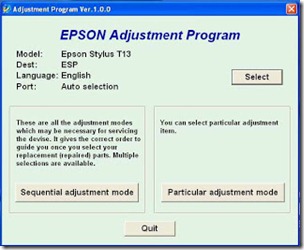
FIX PRINTER ERROR parts inside printer  end service life or part inside your printer is near end service life. Note: Before  opening  the program into your storage device, adjust first the date of your computer  depending of what kind of Epson Resetter. This program is compatible for Windows Xp and Windows 7 32 bit version. Extract the compressed files after changing the time of your pc systems So heres the guide.
  • Open the . Click “Accept” button to open the program

adjustment

Click "Select" button. and choose your printer model then click "OK"
particular

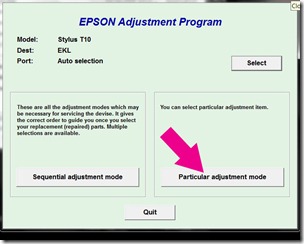
Click “Particular adjustment mode” button.
pad

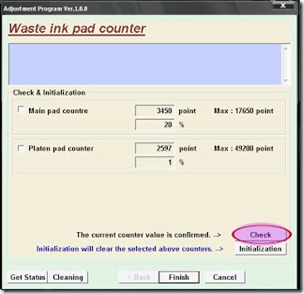
Select on “Waste ink pad counter” and click “OK” button
initialize

Check on Main pad counter and click on “Initialization” button and the program will reset the protection counter.
  • Turn off the printer as a program instructed then turn on again
Note: I used different images  of resetter  because I don’t have time to open all the resetter and take a screenshot. Almost all of Epson adjustment program menu is identical.
Read more

Sunday, November 9, 2014

Epson Stylus S22 Parts inside error

Parts inside printer near end service life” or the message “parts inside printer end of service life”. but before following the procedure, make sure that the printer is on, usb cord properly connected to your computer and most of all there’s no pending print task in your printer. This epson resetter is for the Epson Printer with a model of Epson Stylus S22.

 Follow the steps below:
  • Open AdjProg.exe
  • Click Accept
  • Click Select button, and click your printer model
  • Click "OK"
  • Click the Particular Adjustment Mode
  • Select Waste ink pad counter
  • Click OK
  • Click Initialization (this will reset counter)
  • Turn off the printer
  • Then turn on again.
download Epson resetter  here 
Read more

Epson Stylus TX525FW Reset

Troubleshoot the Printer problem "parts inside printer near end service life” or “parts inside printer end of service life”, but before follow the procedure, make sure that the power of the printer is on, usb cord properly connected to your computer and most of all there’s no pending print task in your printer.
 
Follow the steps below:
  • Open AdjProg.exe
  • Click Accept
  • Click Select button, and click your printer model
  • Click "OK"
  • Click the Particular Adjustment Mode
  • Select Waste ink pad counter
  • Click OK
  • Click Initialization (this will reset counter)
  • Turn off the printer
  • Then turn on again.
Done
Click here to download resetter
Read more

Saturday, November 8, 2014

Epson STYLUS PHOTO R800 counter reset

Reset Epson Stylus Photo R800 with end of service life error.
 
Follow the steps below:
  • Open program
  • Click Accept
  • Click Select button, and click your printer model
  • Click "OK"
  • Click the Particular Adjustment Mode
  • Select Waste ink pad counter
  • Click OK
  • Click Initialization (this will reset counter)
  • Turn off the printer
  • Then turn on again.
Done
Reset Download
Read more

Friday, November 7, 2014

Reset Epson STYLUS PHOTO RX500 and Epson RX510

Troubleshoot the Printer problem "parts inside printer near end service life” or “parts inside printer end of service life”, but before follow the procedure, make sure that the power of the printer is on, usb cord properly connected to your computer and most of all there’s no pending print task in your printer.
 
Follow the steps below:
  • Open AdjProg.exe
  • Click Accept
  • Click Select button, and click your printer model
  • Click "OK"
  • Click the Particular Adjustment Mode
  • Select Waste ink pad counter
  • Click OK
  • Click Initialization (this will reset counter)
  • Turn off the printer
  • Then turn on again.
Done
Reset Epson STYLUS PHOTO RX500 and Epson RX510 here to download
Read more

Thursday, November 6, 2014

Epson Stylus Photo T50 Counter Initialization

Before opening program, adjust first the date of your computer depending of what kind of Epson Resetter did you have. And make sure there is no pending print task in your printer

Follow the guide:
  • Open the program
  • Click “Accept” button to open the program
  • Click "Select" button. and choose your printer model then click "OK"
  • Click “Particular adjustment mode” button
  • Select on “Waste ink pad counter” and click “OK” button
Check on Main pad counter and click on “Initialization” button and the program will reset the protection counter.
  • Turn off the printer as a program instructed then turn on again
  • Finish
Epson Stylus Photo T50 Counter Initialization download 
Read more

Wednesday, November 5, 2014

EPSON STYLUS T33 counter

Reset the Printer problem "parts inside printer near end service life” or “parts inside printer end of service life”, but before follow the procedure, make sure that the power of the printer is on, usb cord properly connected to your computer and most of all there’s no pending print task in your printer.
Follow the steps below:
  • Open program
  • Click Accept
  • Click Select button, and click your printer model
  • Click "OK"
  • Click the Particular Adjustment Mode
  • Select Waste ink pad counter
  • Click OK
  • Click Initialization (this will reset counter)
  • Turn off the printer
  • Then turn on again.
Done
Download utility  here
Read more

Tuesday, November 4, 2014

Epson Stylus CX4100 – Epson CX4700 Reset

Repair end of service life error. Supported models are
  • Epson Stylus CX4100
  • Epson Stylus CX4200
  • Epson Stylus CX4700
  • Epson Stylus CX4800
  • Epson Stylus D4200
Click here to Download the epson resetter program. Windows XP is the recommended operating system to use. Not Recommended Windows 7

Follow the steps below:
  • Open AdjProg.exe
  • Click Accept
  • Click Select button, and click your printer model
  • Click "OK"
  • Click the Particular Adjustment Mode
  • Select Waste ink pad counter
  • Click OK
  • Click Initialization (this will reset counter)
  • Turn off the printer
  • Then turn on again.
Read more

Monday, November 3, 2014

Ink Overflow error Epson Stylus TX510 and Epson TX515 or end of service life error

Fix printer problem "parts inside printer near end service life” or “parts inside printer end of service life”, but before follow the procedure, make sure that the power of the printer is on, usb cord properly connected to your computer and most of all there’s no pending print task in your printer.

 here for Epson Resetter programFollow the steps below:
  • Open AdjProg.exe
  • Click Accept
  • Click Select button, and click your printer model
  • Click "OK"
  • Click the Particular Adjustment Mode
  • Select Waste ink pad counter
  • Click OK
  • Click Initialization (this will reset counter)
  • Turn off the printer
  • Then turn on again.
Finish 
Read more

How Replace Color Cartridge on Epson 600Q Stylus ?

How Replace Color Cartridge on Epson 600Q Stylus ? The Epson Stylus 600Q is an inkjet printer that uses an ink cartridge Epson S020093 Epson S020089 black and color ink cartridge. The cartridges are housed in slots in the carriage is in the inside right of the printer - black in the slot on the left and the right color. Color cartridge replacement is necessary when the "color ink" or flashing light is on and when the cartridge is more than six months and the production of low quality or faded prints. 

Instructions 1 Turn on the Epson 600Q. Fold down the output tray and lift the printer cover.
2 Press the "cleansing" in the control panel for at least three seconds. Wait for the cartridge carrier to slide to the left of its rest position under the housing right side of the printer and the "Power" light will flash. If you want to remove a used cartridge, press the "Load / Eject" button instead.
3 Place your finger on the tab on the front of the cartridge slot and lift color ink cartridge cover.
4 Lift the cartridge slot, reserved for disposal.
5 Remove the color cartridge from its packaging. Hold the yellow tape at the top of the cartridge and gently pull it.
6 Place the new cartridge over the color cartridge slot with the arrow on the top label facing the printer. Insert the cartridge into the slot and then put on the lid and press firmly into place.
7 Press the "Clear" and lower the top of the printer in its original position to begin charging the ink. Wait about two minutes. When the "Power" light stops flashing and you can not hear the charging process will start printing again. 
Read more

HOW RESET CX 5500 EPSON STYLUS PRINTER

How to reset my epson stylus CX 5500 All in One printer ? Epson Stylus CX 5500 All in One printer with DURABrite Ultra ink. This printer can print and copy with one-touch buttons with print speeds up to 25 ppm (pages per minute) and can print images up to 5760 x 1440 dpi. This printer can also scan directly to a PC at 600 dpi.tutorial software resetter Epson CX5500 Download and extract the file.
Run "ServiceFT.exe"
Select waste ink pad against the Maintenance heading, double click to run it.
Click the button to restore the protection initialization current counter to zero.
Read (again), after "0" final press
Choose shipping data set (menu below)
Choose whole
Wait time (1 minute)
If there is a reaction to the printer (which is loaded a bit of paper or listen to "klothak" sound), the process of restoration will be done. Turn the printer off and then back on. read the EEPROM again
If no response from the printer, repeat step 1
download
CX5500  here
Read more

Sunday, November 2, 2014

Epson Stylus C63 to Epson Stylus C65 Counter adjustment

Troubleshoot the Printer problem "parts inside printer near end service life” or “parts inside printer end of service life”, but before follow the procedure, make sure that the power of the printer is on, usb cord properly connected to your computer and most of all there’s no pending print task in your printer.
Follow the steps below:
  • Open AdjProg.exe
  • Click Accept
  • Click Select button, and click your printer model
  • Click "OK"
  • Click the Particular Adjustment Mode
  • Select Waste ink pad counter
  • Click OK
  • Click Initialization (this will reset counter)
  • Turn off the printer
  • Then turn on again.
  download the program for epson
another for epson t13 at here http://goreset.blogspot.com/2010/12/download-software-resetter-epson-t13.html
Read more

Counter Reset Epson Stylus CX 5100 CX5400

Repair the Printer problem "parts inside printer near end service life” or “parts inside printer end of service life”, but before follow the procedure, make sure that the power of the printer is on, usb cord properly connected to your computer and most of all there’s no pending print task in your printer.

Supporte Model

  • Epson Stylus CX5100
  • Epson Stylus CX5400
  • Epson Stylus CX5300
  • Epson Stylus CX5200

Follow the steps below:
  • Open program
  • Click Accept
  • Click Select button, and click your printer model
  • Click "OK"
  • Click the Particular Adjustment Mode
  • Select Waste ink pad counter
  • Click OK
  • Click Initialization (this will reset counter)
  • Turn off the printer
  • Then turn on again.
Done
Download Resetter
Read more

Saturday, November 1, 2014

Epson STYLUS C110 Reset Counter

Parts inside printer near end service life” or “parts inside printer end of service life”, but before follow the procedure, make sure that the power of the printer is on, usb cord properly connected to your computer and most of all there’s no pending print task in your printer. download Windows 7  and windows xp compatible epson resetter
Follow the steps below:
  • Open AdjProg.exe
  • Click Accept
  • Click Select button, and click your printer model
  • Click "OK"
  • Click the Particular Adjustment Mode
  • Select Waste ink pad counter
  • Click OK
  • Click Initialization (this will reset counter)
  • Turn off the printer
  • Then turn on again.
Read more

Reset Epson Stylus SX515W Printer

Epson Stylus SX515W - Wireless All-In-One Printer
Reset utility for Epson SX515W.

QUESTIONS:
Hi can anyone tell me where i can download a service utility for my printer. I already have SSC service utility ver. 4.30. But this does not cover my printer model. Can anybody help....
 I mean a reset utility like ssc that resets the ink overflow and all the counter values to stop the printer needing to go to epson just to have this done by one of there engineers.Also allows your more flexability when you have a continuous ink supply system...

ANSWER:
The drivers and software can be found at the link below
http://www.epson.co.uk/Store/Printers-and-All-in-Ones/Epson-Stylus-SX515W/Drivers-Support
Read more

Friday, October 31, 2014

Epson Stylus Tx550w Alternate Blinking Error

Fix the error parts inside the printer is near  end of service life, but before follow the procedure, make sure that the power of your epson printer is on, usb cord properly connected to your computer and most of all there’s no pending print task in your computer to printer. With this program you can repair the error of your  Epson Printer with a  model Epson  Stylus Tx550w .

Before Opening the program, check first if there is a readme file inside the compressed file. Just follow the guide what is written there.

Windows XP and Windows 7 here  download Epson Resetter

Follow the steps below:
  • Open AdjProg.exe
  • Click Accept
  • Click Select button, and click your printer model
  • Click "OK"
  • Click the Particular Adjustment Mode
  • Select Waste ink pad counter
  • Click OK
  • Click Initialization (this will reset counter)
  • Turn off the printer
  • Then turn on again.
Read more

Epson Stylus Photo R220 and Epson R230

Fix the Printer error "parts inside printer near end service life” or “parts inside printer end of service life”, but before follow the procedure, make sure that the power of the printer is on, usb cord properly connected to your computer and most of all there’s no pending print task in your printer.

Click here to download the program

Follow the steps below:
  • Open Program
  • Click Accept
  • Click Select button, and click your printer model
  • Click "OK"
  • Click the Particular Adjustment Mode
  • Select Waste ink pad counter
  • Click OK
  • Click Initialization (this will reset counter)
  • Turn off the printer
  • Then turn on again. 
Read more

Epson Stylus CX3900 Printer Reset

Fix parts inside printer near end service life” or “parts inside printer end of service life”, but before follow the procedure, make sure that the power of the printer is on, usb cord properly connected to your computer and most of all there’s no pending print task in your printer.

Click here to Download the files

Follow the steps below:
  • Open AdjProg.exe
  • Click Accept
  • Click Select button, and click your printer model
  • Click "OK"
  • Click the Particular Adjustment Mode
  • Select Waste ink pad counter
  • Click OK
  • Click Initialization (this will reset counter)
  • Turn off the printer
  • Then turn on again. 
Read more

Reset Epson Stylus C79 End of service life error

parts inside printer end of service life, but before follow the procedure, make sure that the power of the printer is on, usb cord properly connected to your computer and most of all there’s no pending print task in your printer. 

Follow the steps below:
  • Extract and Open the program 
  • Click Accept
  • Click Select button, and click your printer model
  • Click "OK"
  • Click the Particular Adjustment Mode
  • Select Waste ink pad counter
  • Click OK
  • Click Initialization (this will reset counter)
  • Turn off the printer
  • Then turn on again. 
Read more