Showing posts with label end. Show all posts

Friday, November 14, 2014

Epson NX130 End of Service Error

This program fix the problem of Epson Printer model Epson Stylus NX130 All-In-One Color Inkjet Printer. The error to fix is end of service life
  •  Unzip the file with  download file using the Winrar Program 
  • run the program AdjProg.exe 
  • Download  Windows 7, Windows XP compatible epson resetter
  • Click on Accept
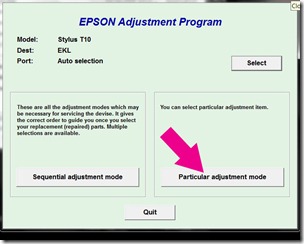
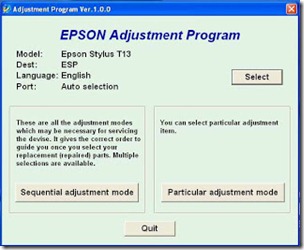
  • Press the button Particular adjusment mode
  • In Model Name select Epson Stylus TX121 then selects Port USB port where your printer NX130 on and Click OK
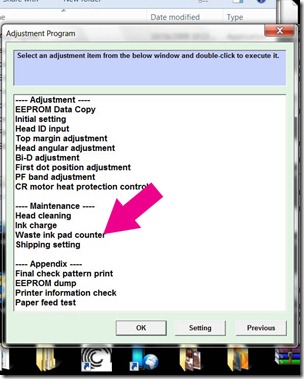
  • Select the Waste ink pad counter and press OK
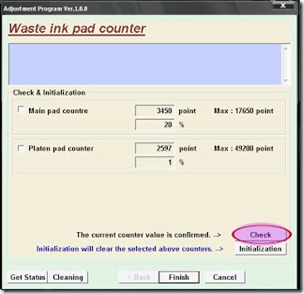
  • Select the button Check for current counter value eeprom of your printer, then check or check the boxes pad Main Counter and FL Box Counter .
  • Then press the button Initialization to reset the counters to 0 
  • Press the button OK and magically the counter will be reset, turn off the printer, press the button Finish to close the window. 
  • Close the program by pressing the button Previous and then press Quit.
Turn off and turn on the printer. Done
Read more

Wednesday, November 12, 2014

Epson Stylus T13 Epson Stylus ME32 end of service life error

FIX PRINTER ERROR parts inside printer  end service life or part inside your printer is near end service life. Note: Before  opening  the program into your storage device, adjust first the date of your computer  depending of what kind of Epson Resetter. This program is compatible for Windows Xp and Windows 7 32 bit version. Extract the compressed files after changing the time of your pc systems So heres the guide.
  • Open the . Click “Accept” button to open the program

adjustment

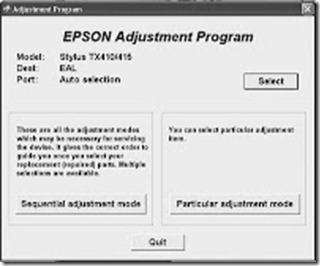
Click "Select" button. and choose your printer model then click "OK"
particular

Click “Particular adjustment mode” button.
pad

Select on “Waste ink pad counter” and click “OK” button
initialize

Check on Main pad counter and click on “Initialization” button and the program will reset the protection counter.
  • Turn off the printer as a program instructed then turn on again
Note: I used different images  of resetter  because I don’t have time to open all the resetter and take a screenshot. Almost all of Epson adjustment program menu is identical.
Read more

Monday, November 3, 2014

Ink Overflow error Epson Stylus TX510 and Epson TX515 or end of service life error

Fix printer problem "parts inside printer near end service life” or “parts inside printer end of service life”, but before follow the procedure, make sure that the power of the printer is on, usb cord properly connected to your computer and most of all there’s no pending print task in your printer.

 here for Epson Resetter programFollow the steps below:
  • Open AdjProg.exe
  • Click Accept
  • Click Select button, and click your printer model
  • Click "OK"
  • Click the Particular Adjustment Mode
  • Select Waste ink pad counter
  • Click OK
  • Click Initialization (this will reset counter)
  • Turn off the printer
  • Then turn on again.
Finish 
Read more

Friday, October 31, 2014

Reset Epson Stylus C79 End of service life error

parts inside printer end of service life, but before follow the procedure, make sure that the power of the printer is on, usb cord properly connected to your computer and most of all there’s no pending print task in your printer. 

Follow the steps below:
  • Extract and Open the program 
  • Click Accept
  • Click Select button, and click your printer model
  • Click "OK"
  • Click the Particular Adjustment Mode
  • Select Waste ink pad counter
  • Click OK
  • Click Initialization (this will reset counter)
  • Turn off the printer
  • Then turn on again. 
Read more

Sunday, October 26, 2014

Reset Epson CX 9300F End of Service Life Error Fix

Epson Stylus CX9300 Reset, Repair parts inside printer near end service life, but before follow the procedure, make sure that the power of the printer is on, usb cord properly connected to your computer and most of all there’s no pending print task in your printer. Click here to download Windows 7 32 bit and Windows Xp Epson Resetter

Follow the steps below:
  • Open program 
  • Click Accept
  • Click Select button, and click your printer model
  • Click "OK"
  • Click the Particular Adjustment Mode
  • Select Waste ink pad counter
  • Click OK
  • Click Initialization (this will reset counter)
  • Turn off the printer
  • Then turn on again.
Done!
Read more

Sunday, October 19, 2014

Near end of service life Epson Stylus R290 Printer Error

Before opening the Epson adjustment program, make sure that the power of the printer is on, properly connected to your computer and most of all there’s no pending print task in your printer. Click here to download the epson resetter Windows XP or Windows 7 32 bit program. This Epson Resetter is for the Printer Model, Epson R285, Epson R280 and of course Epson Stylus Photo R290 Printer.

I can not guarantee that  This Epson Resetter will work to your printer. Depending on your location or your printer bought, The Epson Resetter for this said model dont work. Like in Asia. The epson resetter came from south america is not working for this. Just post the comments if this doesnt work


The Epson Stylus R290 Printer


Follow the steps below:
  • Open AdjProg.exe
  • Click Accept
  • Click Select button, and click your printer model
  • Click "OK"
  • Click the Particular Adjustment Mode
  • Select Waste ink pad counter
  • Click OK
  • Click Initialization (this will reset counter)
  • Turn off the printer
  • Then turn on again.

Read more

Saturday, October 18, 2014

Epson Stylus TX410 and Epson TX415 End of service life

Before opening the Epson adjusment “Adjprog.exe”, adjust first the date of your computer depending of what kind of Epson Resetter did you have. And make sure there is no pending print task in your printer

Open the the program or executable files. Click “Accept” button to open the program
tx410
Click "Select" button. and choose your printer model then click "OK"
particular
Click “Particular adjustment mode” button.
pad
Select on “Waste ink pad counter” and click “OK” button
initialize
Check on Main pad counter and click on “Initialization” button and the program will reset the protection counter.
  • Turn off the printer as a program instructed then turn on again
  • Finish !
I used the same images of resetter because I don’t have time to open all the program and take a screenshot. Almost all of Epson adjustment program menu is identical.

Click here to download the epson resetter
Read more

Thursday, October 16, 2014

Epson ME30 End of Service life

Troubleshoot the Printer problem "parts inside printer near end service life” or “parts inside printer end of service life”, but before follow the procedure, make sure that the power of the printer is on, usb cable (cord) properly connected to your computer and most of all there’s no pending print task in your printer.


Follow the steps below:
Click to download resetter
  • Open program
  • Click Accept
  • Click Select button, and click your printer model
  • Click "OK"
  • Click the Particular Adjustment Mode
  • Select Waste ink pad counter
  • Click OK
  • Click Initialization (this will reset counter)
  • Turn off the printer
  • Then turn on again.
Read more

Monday, October 13, 2014

Epson RX585 Repair near end service life error

Fix the near end of service life error and bring back your epson printer into life. Make sure that the power of the printer is on, properly connected to your computer and most of all there’s no pending print task in your printer. This Program is for Epson Printer with a model of Epson RX585.


Click here to download the Epson Resetter
The Epson Stylus RX585 Printer

rx585
Follow the steps below:
  • Open AdjProg.exe
  • Click Accept
  • Click Select button, and click your printer model
  • Click "OK"
  • Click the Particular Adjustment Mode
  • Select Waste ink pad counter
  • Click OK
  • Click Initialization (this will reset counter)
  • Turn off the printer
  • Then turn on again. 
Read more