Showing posts with label Program. Show all posts

Wednesday, October 29, 2014

Epson T60 Reset program

FIX PRINTER ERROR "parts inside printer end service life, waste ink pad counter overflow error" "Service Required.
Follow the steps below to reset the protection counter.

ink_level
Note: Before opening the Epson adjustment “Adjprog.exe”, adjust first the date of your computer depending of what kind of Epson Resetter you have
First  Open the Adjprog.exe. Click “Accept” button to open the program


Click “Particular adjustment mode” button.
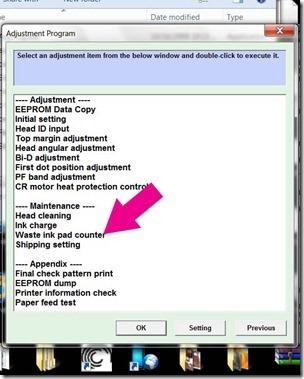
wasteink

Select on “Waste ink pad counter” and click “OK” button
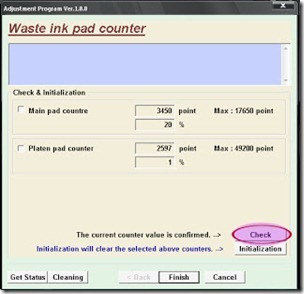
counter
Check on Main pad counter and click on “Initialization” button and the program will reset the protection counter.
  • Turn off the printer as a program instructed then turn on again
  • Click “Finish” button
  • Done!
   download windows 7 windows xp  Epson Resetter program
Read more

Saturday, October 18, 2014

Epson Stylus Office T1100 Adjusment Program

The error message appears "parts inside printer near end service life” or the message “parts inside printer end of service life” in your Epson Office T1100. but before following the procedure, make sure that the printer is on, usb cord properly connected to your computer and most of all there’s no pending print task in your printer.

Follow the steps below:
  • Open AdjProg.exe
  • Click Accept
  • Click "OK"
  • Click the Particular Adjustment Mode
  • Select Waste ink pad counter
  • Click OK
  • Click Initialization (this will reset counter)
  • Turn off the printer
  • Then turn on again
Done!

Click here to download the program
Read more

Friday, October 17, 2014

Epson Adjustment Program for Stylus Photo R270

Protection counter is full. The error message appears  "parts inside printer near end service life” or the message “parts inside printer end of service life”, but before following the procedure, make sure that the  printer is on, usb cord properly connected to your computer and  most of all there’s no pending print task in your printer.
Follow the steps below:
  • Open AdjProg.exe
  • Click Accept
  • Click Select button, and click your printer model
  • Click "OK"
  • Click the Particular Adjustment Mode
  • Select Waste ink pad counter
  • Click OK
  • Click Initialization (this will reset counter)
  • Turn off the printer
  • Then turn on again.
Done
Click here to Download the resetter
Read more