Wednesday, October 15, 2014

Canon MX328 Reset

Canon Pixma MX328 is one of the Inkjet multifuction (Print, Scan, Copy, Fax) printer from Canon. Like general case of printer, after filled by ink usually ink level not full. At some cases of printer, after ink level empty, printer cannot be used to print.

Here the Solution to reset the ink level for Canon Pixma MX328 follow this steps to reset the ink level in your canon MX328.


First step:
  • Unplug  the power cord cable
  • Connect it while holding down the power button
  • With the power button still down
  • press twice the "Cancel" red button
  • Release the power button
  • The printer turns into a  factory mode...(wait for about 10 seconds, until the message "Idle" appears)
  • Press the ">" (next to the "OK" button) once."Shipping Mode 3"
  • Press the "OK" button
  • Press "OK" again for "Without cleaning"
  • A test page will print
  • Open the cover
  • Disconnect the power cable again
  • Take out both cartridges
  • Close the cover
  • Connect the power cable once again
  • Turn the printer on
  • Now just put the cartridges back
Second Step

  • Switch off the Canon MX328 and disconnect the power cable
  • While press and hold the power button, Connect the power cable to electric socket
  • While pressing the power button, press the “Cancel” button (red button)
  • Now release the power button and the printer turns into a kind of factory mode. Wait for 10 seconds until it says “idle”
  • Press “>” (next button) once “Shipping Mode 3?
  • Press the “OK” button. Press “OK” again for “without cleaning”
  • A test page will print
  • Open the cover, like you are about to change the cartridges
  • Disconnect the power cable again without switch off the printer
  • Take out the both cartridges
  • Close the cover
  • Connect the power cable and turn on the printer
  • put the cartridges back and the ink level in the canon Pixma MX300 have full again.
To finish resetting.. Download the software reset program
Software

Click here to Download Service Tools
Read more

Resetter Printer Canon All in One Download

 Printer Canon All in One

Resetter Printer Canon All in One Download

When we need to print something, the printer is error, then we have to find solution to solve it. you need to reset your printer. For you who need to reset your Canon All in one, here is the best place for you to download the resetter.

This is how to reset Canon All in One

  • Turn On your printer until you see Error Eo8 comes up, and you also see "The Ink Absorber is Almost Full"  on your monitor.
  • Prepare Resetter Canon  (can be downloaded by clicking the download link below)
  • Make your printer in Service Mode. This is how to do it:

    • Turn of the Error Printer by pushing POWER button, do not unplug the Power Cable
    • Press and hold the STOP/RESET button together with POWER button
    • Release STOP/RESET  button but do not release POWER button
    • While you are still pressing the POWER Button, Press STOP/RESET 6 times
    • then release both of button (STOP/RESET and POWER Buttons) at the same time, then your printer will be in the Service Mode

  • The computer will detect a new device/hardware, ignore it
  • Then extract and run the Software
  • In the menu absorber clear ink counter Choose Main then click  SET in the right side.
  • In the menu ink absorber counter choose Main then click  SET  in the right side. 
  • Then click  EEOPROM. then a printer will print a page.
  • Youre done. the printer will works well.

    Resetter Printer Canon All in One Download link

  Printer Canon Type

 Download

Canon ip1980  
Canon ip1880
Canon IP2770
Canon Pixma Mp258
Canon Pixma iP1000
Canon iP1200
Canon iP1300,
Canon  iP1600, iP1700, iP1800, iP2200, iP2500
Canon MP150, MP160
Canon  MP170, MP180, MP450, MP460
Canon Pixma iP1300,
Canon Pixma iP1800
Canon Pixma  iP1700

Read more

Tuesday, October 14, 2014

Canon Pixma MP237 Printer Driver Free Download

Canon
Canon Pixma MP237 Printer

Canon Pixma MP237 Printer Driver Free Download review

Here you can download Canon Pixma MP237 Printer Driver for your new printer or you just want to update the drivers.
This drivers will work well for your operating systems, unfortunately, this drivers only work for windows version. Here are the system requirement for your Devices.
  • Windows 8(32bit)
  • Windows 8(64bit)
  • Windows 7(32bit)
  • Windows 7(64bit)
  • Windows Vista SP1 or later(32bit)
  • Windows Vista SP1 or later(64bit)
For you who want to download the driver, make sure you have the same type of the Canon printer that is mentioned above, if you have the wrong printer, this driver will not work

Software information:
  • File name : xp68-win-mp230-5_60a-ea32_2.exe
  • File version : 5.60a
  • File size : 24,712KB

Canon Pixma MP237 Printer Driver Free Download link

Here is the download link for Canon Pixma MP237 Printer Driver, just by one click you will have the driver, please download from the link below.
Read more

Epson Stylus Photo 1420 Counter Adjustment

Before following the procedure,  make sure that the power of the printer is on, properly connected to your computer and most of all there’s no pending print task in your printer.
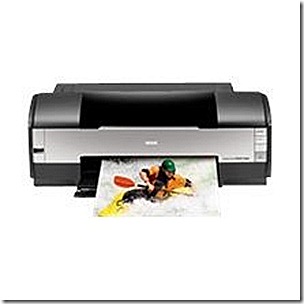
The Epson Stylus Photo 1420  Printer Model
sp1420printer
Follow the steps below:
sp1420
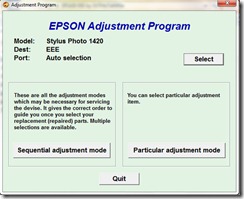
  • Open AdjProg.exe
  • Click Accept
  • Click Select button, and click your printer model
  • Click "OK"
  • Click the Particular Adjustment Mode
  • Select Waste ink pad counter
  • Click OK
  • Click Initialization (this will reset counter)
  • Turn off the printer
  • Then turn on again.
Finish

  here to download the resetter
Read more

Monday, October 13, 2014

Epson WorkForce Pro WP 4530 Printer Specifications and Drivers

Boasting two-sided print speeds of 9.2 ISO ppm (black) and 7.1 ISO ppm (color), this ultra efficient Epson C11CB33201 WorkForce Pro WP-4530 Wireless All-in-One Color Inkjet Printer moves at your busy pace. Offering remarkable productivity, it features a 330-sheet paper capacity and a 20,000-page duty cycle. Use the 30-page two-sided Auto Document Feeder to quickly copy, scan or fax one- or two-sided documents. Best of all, the Epson C11CB33201 WorkForce Pro WP-4530 Wireless All-in-One Color Inkjet Printer offers low hassle, extra large, easy to install cartridges, with a high-yield of 2400 pages Black, 1200 pages color. Built-in wireless networking makes it easy to share your all-in-one printer with others.

Specifications

Copy
  • Copy Speed: 1 – 99 (PC-free)
  • Copy Quality:
    • Color
    • Black / White
    • Draft
    • Normal
  • Maximum Copy Size: 8.5" x 14" (PC-free)
  • Copy Features:
    • Fit to page
    • Automatic reduction and enlargement (25 – 400%)
    • Adjustable copy density
Scan
  • Scanner Type: Color flatbed / Automatic 2-sided ADF
  • Photoelectric Device: Color CIS line sensor
  • Optical Resolution: 2400 dpi
  • Hardware Resolution: 1200 x 2400 dpi
  • Maximum Resolution: 9600 x 9600 dpi interpolated
  • Scanner Bit Depth: 48-bit color / 24-bit output
  • Scan Features:
    • Scan-to-PC
    • Scan-to-PDF
    • Scan-to-email
Fax
  • Fax Settings: Black-and-white and color
  • Fax Speed: 33.6 Kbps – as fast as 3 sec per page
  • Memory: Up to 180 pages
  • Speed Dials: 60 (max.)
  • PC Fax: Supported
Features
  • Save on Ink: up to 50% less cost per page than color laser
  • Worlds Fastest automatic two-sided printer: ideal for busy workgroups
  • Reload paper less often: 330-sheet paper capacity, including an 80-sheet rear-feed tray for alterative papers, envelopes, labels and card stock
  • Remarkable durability: up to 20,000 pages duty cycle
  • Professional quality color: print attention-getting marketing materials or presentations that exceed your clients expectations
  • Do more: 30-page two-sided Auto Document Feeder to quickly copy, scan or fax stacks of one- or two-sided originals
  • Built-in networking: easily connect and share with others in your workgroup via wireless or wired networking
  • Save up to 50% of your paper supply: built-in automatic two-sided printing and copying
  • Smudge, fade and water resistant documents: ink wont run or smear
  • High-speed faxing in black and color: as fast as 3 sec per page; speed dial storage up to 60 numbers; fax memory up to 180 pages
  • Epson Connect: get instant wireless printing from popular mobile devices
  • Save energy: uses up to 70% less power than laser printers
  • Epson WorkForce Pro WP-4530 All-in-One  Drivers
Read more

Epson Tx121 Resetter Printer Download

Epson Tx121 Printer

Epson Tx121 Resetter Review

Do you find difficulties with your printer? is your Epson Tx121 Error? This situation is very frustrated isnt it? Here we would like to show you how to reset Epson Tx121 by using Epson Tx121 Resetter. The resetter can be downloaded from the download link below, however for you who do not familiar with the way how to reset the printer, you can watch the tutorial video below


Epson Tx121 Resetter Download

Read more

Epson Stylus C88 Inkjet Printer Specifications And Drivers

The Epson Stylus® C88+ speeds through critical projects and reports, delivering amazing quality and durability, time after time, with revolutionary DURABrite® Ultra pigment ink. This powerful performer gives you incredible results, whether youre printing a photo or proposal.

wp-450
Print frame-ready photos in popular borderless sizes. Or, use the high-capacity input tray to quickly produce beautiful charts and handouts. DURABrite Ultra pigment ink ensures amazing clarity and color whether you use plain or photo paper. Best of all, with convenient, individual ink cartridges, you can take control of ink usage, replacing only the color that you need.

With USB and parallel connectivity, plus convenient networking options, this printer is the ideal solution for both Windows® and Macintosh® computers. Now, anyone can achieve astounding results, project after project, with the exceptional power and performance of the Epson Stylus C88+.

Specifications

Print Method

Inkjet

Color Output Color
Fax Capability No
All-In-One No
Printer Use Photo
Print Speed Up to 14 PPM (Color)
Up to 23 PPM (Black)
Network Ready No
Automatic Feeder Yes
Resolution Up to 5760 x 1440 dpi Optimized DPI
Print Speed B/W 23 ppm
Print Speed Color 14 ppm
Special Features Border Free Printing
Dimensions 18.11"W x 17.2"D x 12.2"H
Connectivity USB 2.0
IEEE 1284 parallel
Standard Paper Input 120 Sheets
Duplex Printing No
Paper Sizes Supported Letter, Legal, A4, A5
 
Epson Stylus C88+  Inkjet Printer Driver Download
Read more