Sunday, November 2, 2014

Easy Reset Epson R300 Ink Overflow

How to Reset Epson R300 Ink Overflow ?
Instructions

1.  Turn the printer off. Remove the back access panel on the printer by removing its screw with the screwdriver.
2.  Locate the tube for the cleaning pump with the help of a flashlight. The tube is on the lower left portion of the printer and has an open end.
3.  Pull the tube out through the access panel with the use of a wire coat hanger.
4.  Place the end of the tube into the plastic container.
5.  Tape the tube to the side of the plastic container using duct tape. This keeps them together if the printer is bumped or moves while printing. Turn on the printer.
6.  Press and hold the "Stop," "Maintenance" and "Power" buttons at once for 10 to 15 seconds. A message appears saying the printer has been reset.
7.  Turn off the printer and unplug it from the wall. Wait for one to two minutes.
8.  Plug the Epson R300 back into the wall. Turn the printer back on.

Things youll need:
Screwdriver
Flashlight
Wire coat hanger
Plastic container
Duct tape
Read more

Epson TX121 and Epson ME320 Resetter


Before  opening  the Epson Resetter program, adjust  the date of your computer  depending of  what kind of Epson Program  you have. And make sure that theres no pending print task in your computer to your printer. This Epson resetter is for the  used of Epson printer with model Epson Stylus TX121 and Epson ME320 priter. This program is recommended for used of Windows XP operating Sytem and Windows 7 32 bits version.


 Open the executable files. Click “Accept” button to open the program


Click "Select" button. and choose your printer model then click "OK"

particular

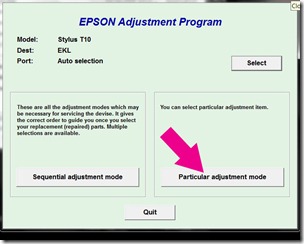
Click “Particular adjustment mode” button.

pad

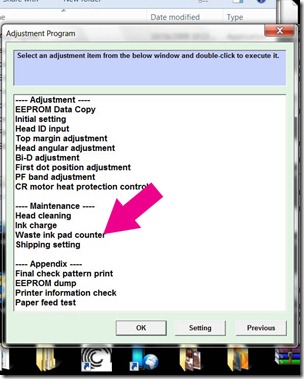
Select on “Waste ink pad counter” and click “OK” button

initialize

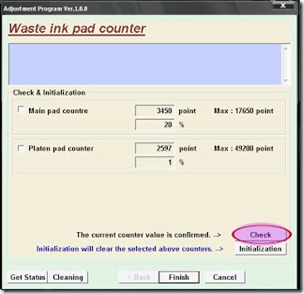
Check on Main pad counter and click on “Initialization” button and the program will reset the protection counter.
  • Turn off the printer as a program instructed then turn on again
  • Finish !
 download epson resetter to your computer
Read more

Saturday, November 1, 2014

Epson STYLUS C110 Reset Counter

Parts inside printer near end service life” or “parts inside printer end of service life”, but before follow the procedure, make sure that the power of the printer is on, usb cord properly connected to your computer and most of all there’s no pending print task in your printer. download Windows 7  and windows xp compatible epson resetter
Follow the steps below:
  • Open AdjProg.exe
  • Click Accept
  • Click Select button, and click your printer model
  • Click "OK"
  • Click the Particular Adjustment Mode
  • Select Waste ink pad counter
  • Click OK
  • Click Initialization (this will reset counter)
  • Turn off the printer
  • Then turn on again.
Read more

Epson TX110 Printer Resetter

Resetter Epson TX110 and Epson TX111

Need resetter for Epson TX110 and EPson TX111 you can download the adjustment program or software resetter below. I not tested this software resetter because I dont have the both Epson printer series.

Epson TX110 and epson TX111 is all in one or multifunction inkjet printer designed for home user that combined copy, print, and scan functions. Epson TX110 and epson TX111 using Durabrite Ultra Ink and max print resolution is 5760x1440 dpi on A4 paper but this printer not support for wireless connectivity.

If you require adjustment program or software resetter for Epson TX111 and Epson TX100 you can download the software from following link: download resetter epson TX110 and TX111
Read more

HOW RESET EPSON T5570 CARTRIDGE CHIP

How to Reset a T5570 Cartridge Chip ? Refilling printer cartridges can help reduce the cost of printer maintenance. Epson cartridges use "smart chips" that detect the level of ink cartridge. When the cartridge begins to run out of ink, it gives a message to the printer. Thats how he learns that the cartridge must be recharged or replaced. Even if the cartridge is reloaded due, the chip still give low ink messages unless you reset the chip.

Instructions
Tools: Towels, Chip resetter for Epson T5570 

1 Buy a smart chip resetter for Epson T5570. You can buy online or buy an office supply store.
2 Clean the cartridge with a towel. Be careful when cleaning the nodes in the back of the cartridge, because this is where you set the resetter.
3 Hold the resetter to the back of the cartridge. Bottom of the resetter has a button on it. This part should come in the top, while the saturation.
4 Press the resetter and hold for about 8 seconds. This will restore the factory settings of the cartridge. You know that the cartridge has been revived by a small LED light on the resetter will start blink.
5 Release the clip at the bottom of the resetter to remove the cartridge.
6 Insert the cartridge into the printer. The printer will recognize the refilled ink level.
Read more

Reset Epson Stylus SX515W Printer

Epson Stylus SX515W - Wireless All-In-One Printer
Reset utility for Epson SX515W.

QUESTIONS:
Hi can anyone tell me where i can download a service utility for my printer. I already have SSC service utility ver. 4.30. But this does not cover my printer model. Can anybody help....
 I mean a reset utility like ssc that resets the ink overflow and all the counter values to stop the printer needing to go to epson just to have this done by one of there engineers.Also allows your more flexability when you have a continuous ink supply system...

ANSWER:
The drivers and software can be found at the link below
http://www.epson.co.uk/Store/Printers-and-All-in-Ones/Epson-Stylus-SX515W/Drivers-Support
Read more

How to reset epson T13, where can i get resetter Epson T13 ?

Now resetter for Epson T13, T1100 and TX121 as available for download. If you need this version resetter can download the software.


The Epson T13  is a printer designed by Epson Company for use with PCs and laptops. print cartridges are used to store and distribute the ink to print. Finally, the ink in these cartridges is depleted and will have to replace the cartridge or ink refill. Some electronics stores computer can refill cartridges for payment if you provide the ink. If you want to save some money, you can fill and reset these cartridges on their own. 
Read more